Friday, July 12, 2013

A YouTube Experiment Increases Text Size

This is not a bug, it's an YouTube experiment that increases the text size for suggestion links to 19 pixels. I think the text is way too big and distracting.


Here's the regular interface (13 pixels):


Here's how you can enable the experimental feature. If you use Chrome, Firefox, Opera, Safari or Internet Explorer 8+:

1. open youtube.com in a new tab

2. load your browser's developer console:

* Chrome - press Ctrl+Shift+J for Windows/Linux/ChromeOS or Command-Option-J for Mac

* Firefox - press Ctrl+Shift+K for Windows/Linux or Command-Option-K for Mac

* Opera - press Ctrl+Shift+I for Windows/Linux or Command-Option-I for Mac, then click "Console"

* Safari - check this article

* Internet Explorer - press F12 and select the "Console" tab.

3. paste the following code which changes a YouTube cookie:

document.cookie="VISITOR_INFO1_LIVE=-fntp2HbKFI; path=/; domain=.youtube.com";window.location.reload();

4. press Enter and close the console.

To go back to the regular interface, use the same instructions, but replace the code from step 3 with this one:

document.cookie="VISITOR_INFO1_LIVE=; path=/; domain=.youtube.com";window.location.reload();

Beyond Google Latitude

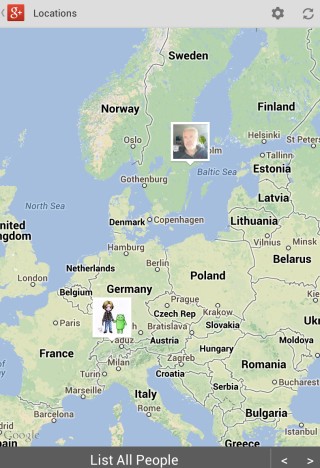
Joe LaPenna, from Google, wrote an interesting post on Google+ about Google Latitude and the future of location sharing. He worked on Google Latitude for 5 years and he'll take Latitude offline in one month.

"We're still working on location sharing and I'm still really happy with G+ Location. Its a rewrite of the Latitude stack but built for a world where social is a layer across all of the Google experience, not just deposited in a corner of Google Maps. In a month, when Latitude goes dark, we'll have G+ Location there, ready for us (Android is ready, iOS is on its way). And what's better is you can share your location with the people that you care about, they can see it on a map and they don't even have to do a single thing. No invites. No emails and links and websites and hooha. They just open G+ click on Location and see your happy face," says Joe.

After unfriending all the 140 people contacts from Google Latitude and switching to Google+ location sharing, Joe noticed something striking: "I don't see as many people on the map as I did before but the difference is quickly and steadily shrinking. I definitely see more people I care about now (three months after G+ Location launched) than I did right after Latitude launched. This whole process really made me aware and confident that building anew was the right thing."

I think it makes sense to move Google Latitude to Google+. Having a separate list of friends you have to manage made sense before Google+ was released, but now it's cumbersome and unnecessary. What doesn't make sense is Google's migration path: instead of adding Google Latitude's features to Google+ and providing a way to import your Google Latitude friends, Google discontinued Latitude and announced everyone that the list of friends will be deleted. Oh, and there's a Google+ location sharing feature, but it only shows a map in the Android app and you'll have to find a way to enable it and add your contacts. Why not automate my instructions from this post and why not discontinue Latitude when there's a decent replacement in all Google+ flavors?


{ via Search Engine Roundtable }

Wednesday, July 10, 2013

Google's +1 Activity Updates

Until now, your Google+ stream only included the posts from people/pages/communities you follow and some posts from the "what's hot" section. Now you'll also see some of the posts +1d by the people you follow.

"Many of the best photos, articles and videos we find online are the ones recommended by friends. So we're making it easier to discover these recommendations in your Google+ stream. Starting today, we'll occasionally highlight posts that were +1'd by people in your circles and if you +1 a post, we may highlight it to your friends as well," says Shimrit Ben-Yair, from Google.

Now +1s for Google+ posts have more value because they're a signal for recommendations. If more people from your circles +1 the same post, then it's likely that you'll want to read it. +1 is now an indirect sharing tool: you're not sharing a post with anyone who is following you (or some of your circles), you're helping Google provide better recommendations. +1s are already used to improve Google's search results, ads and now the Google+ stream.


If you want to control who sees your +1 activity updates, go to this page and change the "visible to" value. The default option is "extended circles", but you can pick "public", "your circles", "only you" or a custom list of circles and people. You can check the posts you +1d here: it's an activity log that starts to show data once this feature is available to you. Google is "rolling out this feature over the next few days".

It's interesting to notice that the default visibility value is extended circles, which include your circles and the people in your circles' circles. That means your +1 can influence a lot of people.


Hopefully, Google+ will do a better job at recommending content than YouTube. Instead of only showing the latest videos uploaded by your subscriptions, YouTube also shows the videos they liked, their comments and more.

The Android Bug 8219321

There's a lot of talk about an Android security bug that affects almost all the Android devices. Jeff Forristal from Bluebox Security reported that "the vulnerability involves discrepancies in how Android applications are cryptographically verified & installed, allowing for APK code modification without breaking the cryptographic signature. Details of Android security bug 8219321 were responsibly disclosed through Bluebox Security's close relationship with Google in February 2013."

So the bug could allow someone to create a modified version of an system app and trick other people to install it. The modified version could include malicious code.

Actually, the bug is simple: APK files are ZIP archives and Android allows APK files to include files with the same name. "It's a problem in the way Android handles APKs that have duplicate file names inside," says Pau Oliva Fora, security engineer at security firm ViaForensics. "The entry which is verified for signature is the second one inside the APK, and the entry which ends up being installed is the first one inside the APK - the injected one that can contain the malicious payload and is not checked for signature at all."

The problem is that Android supported duplicate file names in APKs and the patch removed this support. The patch is extremely simple: return an error if the APK file has duplicate file names.


Apparently, Geremy Condra from Google wrote a patch in February. "Google made changes to Google Play in order to detect apps modified in this way and a patch has already been shared with device manufacturers," informs ComputerWorld. CyanogenMod included the bug fix in the latest release, faster than OEMs and even Google, which didn't update Nexus devices to address this issue.

The bug #8219321 is now a test that will show us how fast Google, OEMs and carriers can deploy security patches. For now, CyanogenMod is the place to go to get the latest features and security patches.

OK Maps, Cache This Map

The latest version of Google Maps for Android doesn't officially include the feature that allowed you to cache maps and use them offline. You won't find it in the settings or in the app's interface.

Fortunately, there's a way to preload maps, but it's not intuitive: type "OK maps" in the search box and tap the search icon. You'll see this message: "pre-loading maps" or an error message: "the on-screen area map is too large, zoom in first". If you see the error message, zoom in and type "OK maps" again. It's annoying to this again and again.


Another downside is that you can't manage your offline maps. Here's a screenshot from the old Google Maps: you could quickly find cached maps, check how much space they use, rename them or delete them.


Hopefully, Google will add the offline feature to the interface in a future update and make it even better. It would be nice to save bigger maps and to use the offline maps for local search, directions and navigation.

Update: A new version of Google Maps added this option when you tap the search box: "Make this map available offline". It's less cumbersome to use, but still a patchwork.

Export Google Latitude Friends

Google Latitude has been discontinued and a help center article offers more information about this. Unfortunately, there's something inaccurate: "you can't export your friend information out of Latitude".

Well, you can export your Latitude friends because they're added to a hidden Gmail group. Here's how to do that:

1. go to this Google Contacts page

2. select all contacts

3. click "More", then "Export" and click the "Export" button. You'll get a CSV file with all your Latitude friends.


4. (optional) import the contacts to Google+ and use location sharing - Google's Latitude replacement. Go to the People section in Google+, click "connect services" in the left sidebar, select "open address book" and pick the CSV file you've exported. You'll get a list of people you can add to a new Google+ circle (let's call it Latitude). Enable location sharing at the bottom of this page and restrict it to the circle you've created: pick "Custom" and select the Latitude circle. Unfortunately, Google only shows location data on profile pages and in the Locations section of the Google+ app for Android, but that may change in the future.


"Google Latitude will be retired on August 9th, 2013. Products being retired include Google Latitude in Google Maps for Android, Latitude for iPhone, the Latitude API, the public badge, the iGoogle Gadget, and the Latitude website at maps.google.com/latitude. We'll delete your list of friends on Latitude. You won't be able to see or manage friends. Any existing friends will no longer see your location in Google Maps for mobile on Android, Latitude for iPhone, the public badge, the iGoogle Gadget, and the Latitude website at maps.google.com/latitude, if you continue to use these products," says Google.

Location History will continue to be available, since it's used by Google Maps, Google Earth and Google Now. "Google Location History is an opt-in feature that allows you to store your past Google location history and see it on a Google Map or in Google Earth. Your Location History is visible only to you." Location Reporting will also be available, since it "allows Google to periodically store and use your device's most recent location data in connection with your Google Account".

New Google Maps App for Android

When Google launched the Maps app for iPhone, many said that it looks better than the Android app. The new interface is now available in Google Maps 7.0 for Android. The app requires Android 4.0.3 and will be rolled out gradually in the coming weeks, but you can download it using these links.


The new Google Maps app has a simplified interface that focuses on the map. It has a lot of things in common with the new Google Maps for desktop, including the missing features. For now, there's no support for My Maps (it will be added later), many layers are missing, Labs features are no longer available. Map caching is now a hidden feature: type "OK maps" in the search box and the app will preload the map you're currently viewing. Google Latitude has been discontinued and replaced by a Google+ feature. In my limited testing, the app was pretty slow and laggy, so Google still has some work to do to optimize the app.


On the plus side, you get a Google Maps interface optimized for tablets, incident reports, dynamic rerouting and some integration with Zagat and Google Offers. "You can now see reports of problems on the road that you can tap to see incident details. While on the road, Google Maps will also alert you if a better route becomes available and reroute you to your destination faster."


There's also a new version of Google Maps for iOS that will be available soon and will add support for iPad.

Tuesday, July 9, 2013

Google Reader Backup Viewer

If you created a full backup for your Google Reader account while it was still possible, you probably need a way browse the data. Fortunately, Mihai Parparita created Zombie Reader, a tool that resurects the Google Reader interface and transforms into a viewer for your data.

"Reader is a canonical single page application: once the initial HTML, JavaScript, CSS, etc. payload is delivered, all other data is loaded via relatively straightforward HTTP calls that return JSON (this made adding basic offline support relatively easy back in 2007). Therefore if I served the archived data in the same JSON format, then I should be able to browse it using Reader's own JavaScript and CSS," says Mihai.

Go to readerisdead.com, download the updated archive and use the instructions from the page. You still need Python 2.7 and some basic command-line skills. For Windows, you could use the instructions from my previous post and replace:

c:\python27\python reader_archive\reader_archive.py --output=download

with

c:\python27\python zombie_reader\zombie_reader.py download


Zombie Reader uses the Google Reader interface and your local data. It's like a Google Reader snapshot that preserved all your subscriptions, all the items you've read or marked as read, all your starred items, your tags and much more. Obviously, many features don't work (search, trends, subscribe), the application doesn't save your state and it doesn't show the latest posts from your subscriptions.

It does show your first read item, first starred item and the first shared item, as well as the people you followed before Reader's social features were removed. The "sort by oldest" feature is no longer limited to the last 30 days, it now sorts all your feed items.

"A side effect is that I now have a self-contained Reader installation that I'll be able to refer to years from now, when my son asks me how I spent my mid-20s," says Mihai. "It also satisfies my own nostalgia kicks, like knowing what my first read item was. In theory I could also use this approach to build a proxy that exposes Reader's API backed by (say) NewsBlur's, and thus keep using the Reader UI to read current feeds. Beyond the technical issues (e.g. impedance mismatches, since NewsBlur doesn't store read or starred state as tags, or has per item tags in general) that seems like an overly backwards-facing option." I'm sure that someone will build the proxy.

Gmail Build Info

Desktop apps are not the only ones that have version numbers, build information and various data that belongs in an "about" page. Web apps also have all of these, but usually only developers can see them.

Here's the build info displayed for the mobile Gmail web app in Chrome. It's probably helpful for debugging the app and only available internally.


"Build At: grapebot@grapebot-cbf-9.cbf.corp.google.com:/usr/local/google/grape/grapebot/runner1_1/superpudu-client_Piper/google3
CL: 49089810
Build Label Verbose: superpudu_130708.00_p0"

Apparently, Grapebot is a bot used to build the Gmail app, while Superpudu is the codename for the mobile Gmail app. There's a list of features that are enabled, including HIGH_RESOLUTION, ACCOUNT_SWITCHER, ADS, SETTINGS_REDESIGN and more. Ads in the mobile Gmail?

Here's the build info for the Android-optimized mobile Gmail:


As you can see, the list of features is slightly different. You can find: GLOW_BUTTONS, STICKY_MENUS, ANY_ZOOMER, DOODLES, WEB_ATTACHMENTS and more.

Here's the build info for iOS. Some new features: BIG_LEAP_PROMO, ATTACH_SINGLE_PHOTO, TWO_PANE_UI (for iPad).


{ Thanks, Florian K. }

Monday, July 8, 2013

Google Now's TV Card

Google Search for Android has recently added a Google Now card for TVs. You tap "listen now for TV shows" and Google detects the TV show you're watching.

This feature has 3 limitations: it's US-only, you need a smart TV and the phone/tablet needs to be on the same WiFi network as the TV. The first limitation makes sense, but the other two seem unnecessary. After all, Google's app can't communicate with the TV and the TV doesn't broadcast the program you're watching.

Here's Google's explanation: "Your Android device uses the Simple Service Discovery Protocol (SSDP) to determine the presence of a TV on the network and related information, such as its model and brand name. This is a standard way for networked devices to locate other devices or services on a home network." So a smart TV is required to only show the TV card when you're watching TV.


"To provide relevant information after you touch Listen for a TV show, TV cards rely on both the WiFi signal and the sound from your TV. You may need to turn up the volume for the cards to work correctly," explains Google. Does this mean that Google records all the TV shows from the US channels?

"Other cards may also appear, telling you more about specific show content as it happens. For example, they may give you more information about celebrities, actors, or other people mentioned in the show."


This is a cool feature, but I don't see why it wasn't added to Google Sound Search. In addition to finding songs, the widget could also find TV shows. Even better, this could be added to Google Voice Search.

Probably not many people remember this, but Google Video started back in 2005 as a search engine for TV content. "Google Video will search the closed captioning text of all the programs in our archive for relevant results. Click on a program title on your results page and you can look through short snippets of the text along with still images from the show," suggested Google at that time. Ironically, Google Video didn't host any video at launch, but this changed after a few months, when Google Video became a video-sharing site.

Chrome Sync Dashboard

If you've ever wondered how many extensions, apps, themes, bookmarks, passwords, Omnibox URLs, autofill items, settings and open tabs are synced by Chrome for your account, there's an online dashboard that shows this information. "Chrome Sync saves your personalized browser features to the web and allows you to access them from Google Chrome on any computer," informs Google.


Unfortunately, the page doesn't include a list of the items that are synced. If you don't use Chrome, you can't access your bookmarks from an online interface and that's pretty strange.

Google Dashboard shows even more information about Chrome Sync: autofill profiles, app settings, search engines and the date of the last sync.

If you're curious to find technical information about Chrome Sync internals, open a new tab in Chrome, paste this: chrome://sync-internals/ and press Enter. You'll find that Chrome synchronizes a lot more things: app notifications, device information, dictionaries, experiments, extension settings, favicons.

Blog Archive